AI Video Caption Generator for Windows
Create polished captioned videos in minutes.
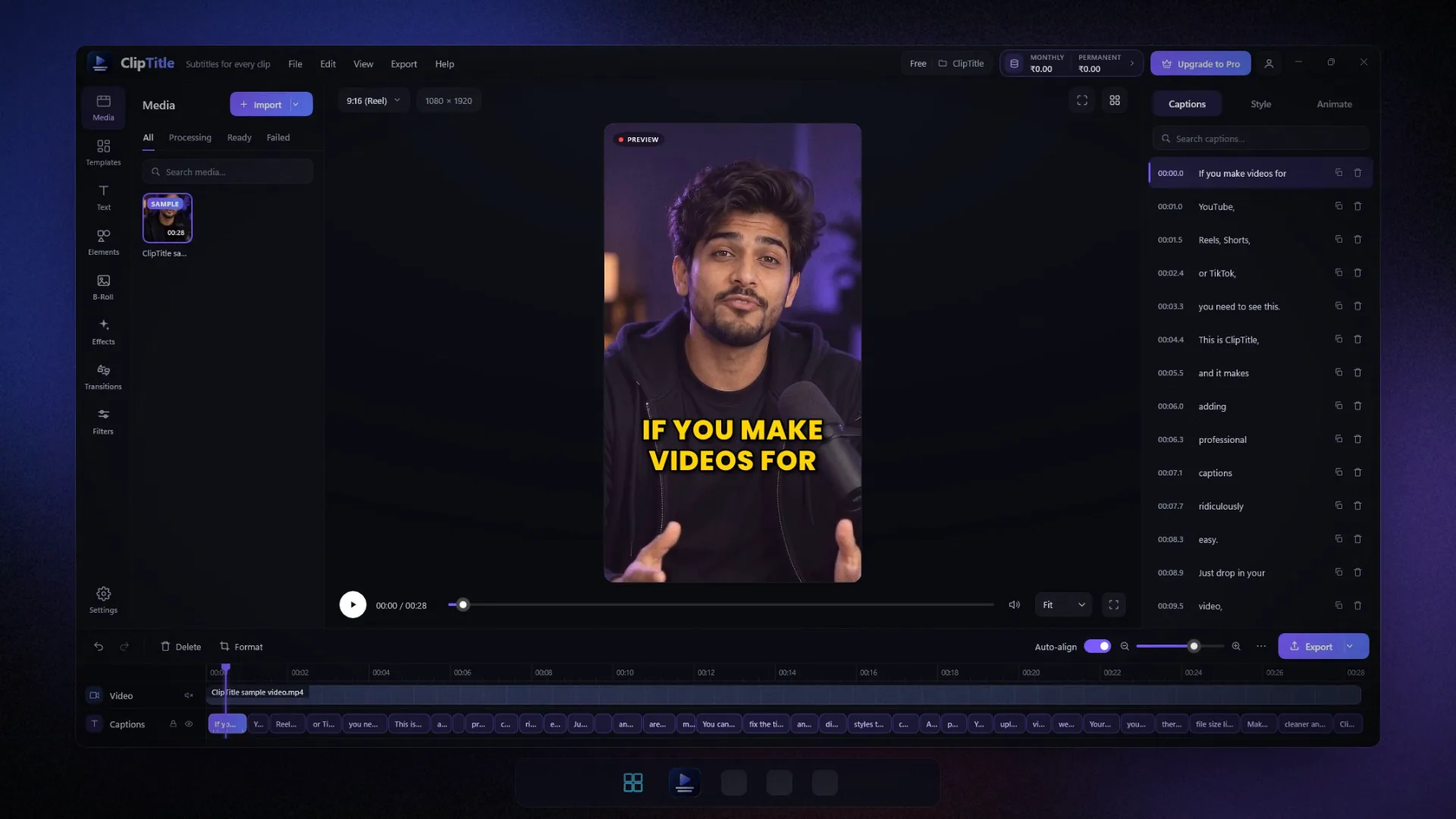
ClipTitle is an AI subtitle and caption generator for Windows PC. Automatically generate word-timed captions in 85+ languages, edit the text and timing, choose a professional caption style, and export a ready-to-publish MP4 (no watermark) or an SRT or VTT subtitle file.
- Windows 10/11
- No watermark
- 85+ languages
No video upload
Only audio is sent. Your video stays on your PC.
Accurate captions
Powered by AI, with every word timed to the speech.
Multiple styles
Choose from modern templates and customize them.
Live preview
See every change instantly before you export.
MP4, SRT & VTT
Export burned-in videos or subtitle files.
85+ languages
Detects the language, even mixed speech.
Before & after
See the difference captions make.
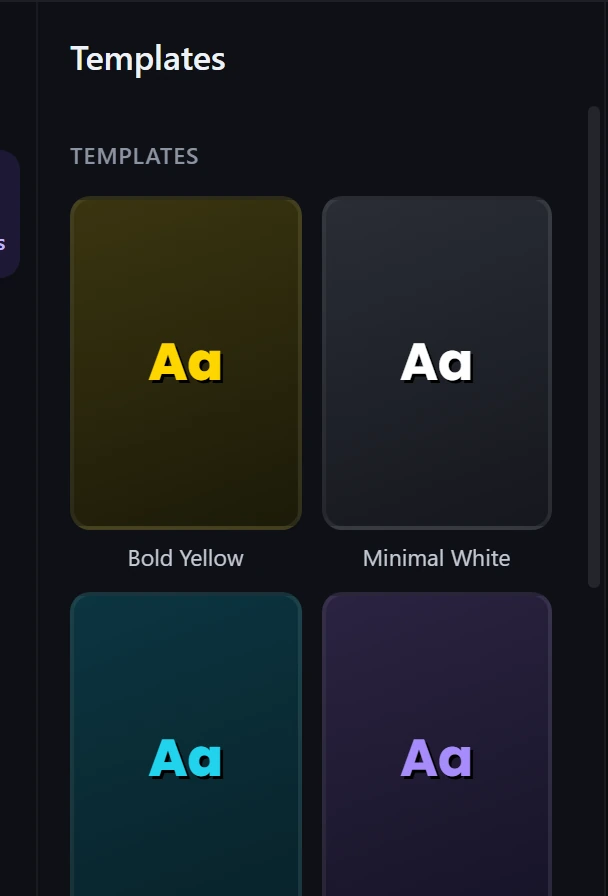
The same clip, before and after ClipTitle. Here are a few of the caption templates in the app, and each one applies in a single click.
Stop losing viewers
85+ languages
Captions in your language. Even mixed.
ClipTitle detects the spoken language automatically, including speech that switches languages mid-sentence, like Spanish + English or Hindi + English.
Try:
- EnglishUS · UK
- EspañolSpanish
- 中文Mandarin
- हिन्दीHindi
- FrançaisFrench
- العربيةArabic
- PortuguêsPortuguese
- РусскийRussian
- DeutschGerman
- 日本語Japanese
- 한국어Korean
- Bahasa IndonesiaIndonesian
- ItalianoItalian
- TürkçeTurkish
- Tiếng ViệtVietnamese
- বাংলাBengali
- EnglishUS · UK
- EspañolSpanish
- 中文Mandarin
- हिन्दीHindi
- FrançaisFrench
- العربيةArabic
- PortuguêsPortuguese
- РусскийRussian
- DeutschGerman
- 日本語Japanese
- 한국어Korean
- Bahasa IndonesiaIndonesian
- ItalianoItalian
- TürkçeTurkish
- Tiếng ViệtVietnamese
- বাংলাBengali
- NederlandsDutch
- PolskiPolish
- УкраїнськаUkrainian
- ไทยThai
- فارسیPersian
- SvenskaSwedish
- ΕλληνικάGreek
- עבריתHebrew
- Filipino
- Bahasa MelayuMalay
- 粵語Cantonese
- தமிழ்Tamil
- తెలుగుTelugu
- मराठीMarathi
- KiswahiliSwahili
- ગુજરાતીGujarati
- ಕನ್ನಡKannada
- മലയാളംMalayalam
- ਪੰਜਾਬੀPunjabi
- አማርኛAmharic
- ՀայերենArmenian
- NederlandsDutch
- PolskiPolish
- УкраїнськаUkrainian
- ไทยThai
- فارسیPersian
- SvenskaSwedish
- ΕλληνικάGreek
- עבריתHebrew
- Filipino
- Bahasa MelayuMalay
- 粵語Cantonese
- தமிழ்Tamil
- తెలుగుTelugu
- मराठीMarathi
- KiswahiliSwahili
- ગુજરાતીGujarati
- ಕನ್ನಡKannada
- മലയാളംMalayalam
- ਪੰਜਾਬੀPunjabi
- አማርኛAmharic
- ՀայերենArmenian
85+
languages
Auto
language detection
Mixed
speech in one video
Features
Everything you need to caption a video.
From the first transcript to the final export, every step is on one screen, and you stay in control of every word.
01AI captions
Studio-grade captions, timed to every word.
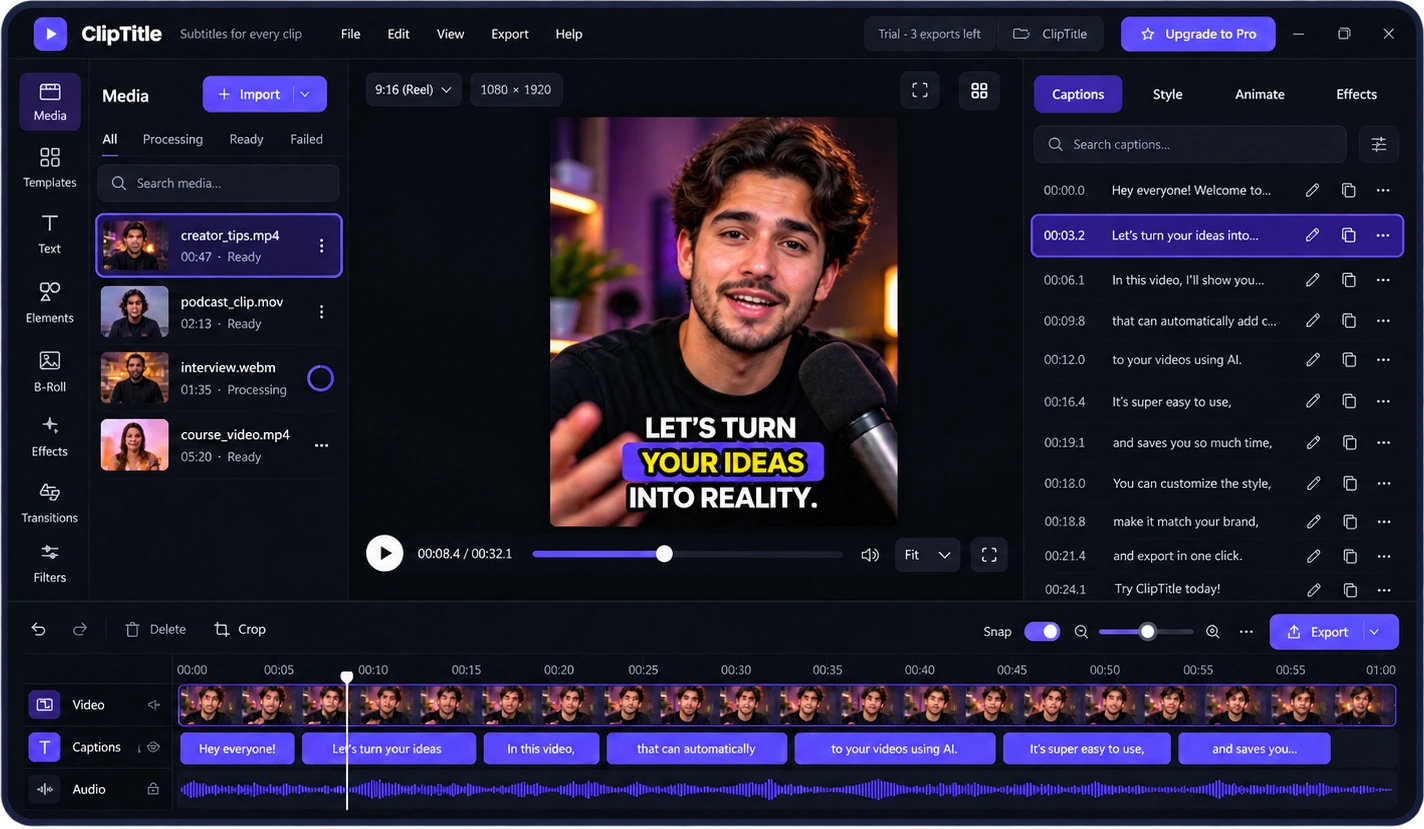
Drop in a clip and ClipTitle transcribes it for you with AI. Every word gets its own timestamp, so captions appear exactly when they're spoken, and any word can be fixed in seconds.
- Word-level timing for Reels, Shorts and long videos
- Review and fix any word in seconds
- Failed transcriptions are never charged
02Formats
Made for Shorts, Reels and YouTube.
Switch between vertical, square and widescreen in one click. ClipTitle reframes your video without stretching it and keeps captions inside the safe area.
- 9:16, 1:1 and 16:9 aspect ratios
- Captions at the top, center or bottom
- Center-crop reframing, never stretched

Your video stays on your PC.
Aspect ratio
Caption position
03Caption styles
Caption styles that look designed.
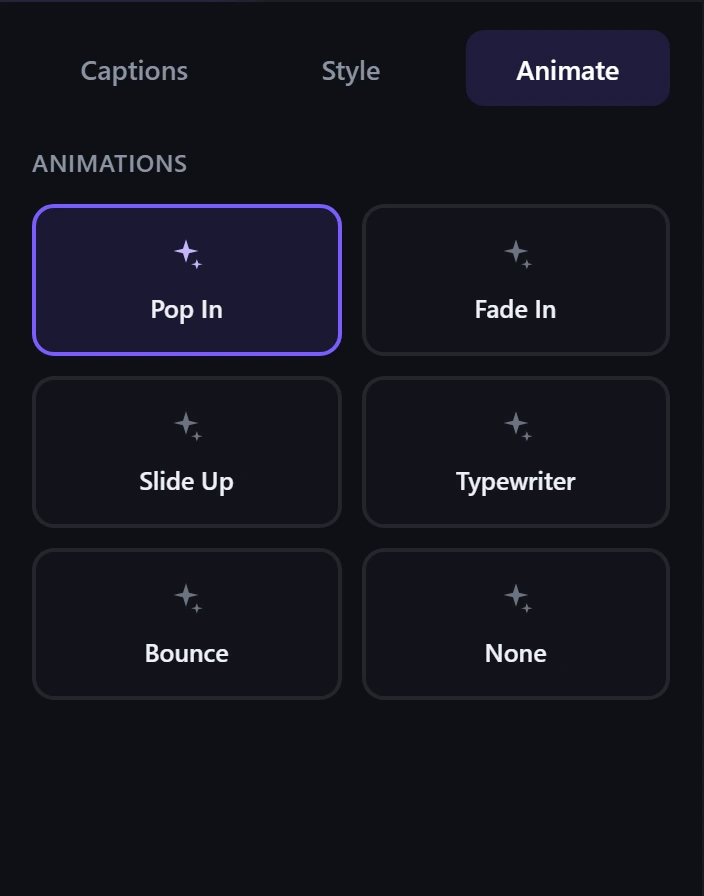
Pick a template like Bold Yellow, Neon Pop or Podcast, add an animation, and watch it update live on your video.
- Ready-made caption templates
- Pop In, Fade In, Slide Up, Typewriter and Bounce animations
- Custom fonts, colours, size and position
04Editing
Fix anything, right on the video.
AI gets you most of the way. You stay in control of every word, style and position before you export.
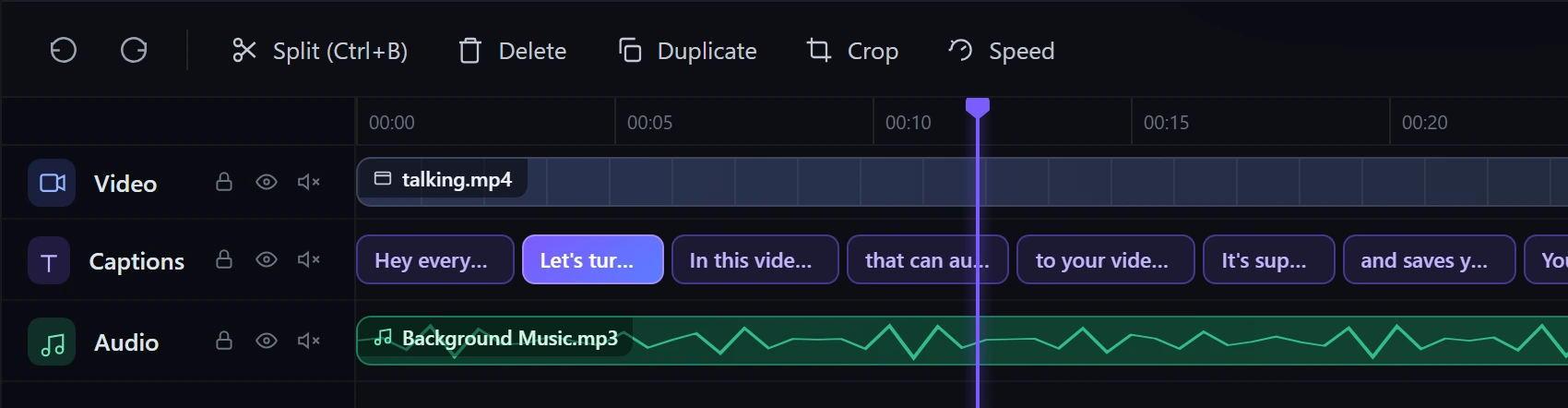
- Search and edit every caption line
- Split, duplicate and delete on the timeline
- Undo and redo keep every change safe
05Export
Export the way you need it.
A finished MP4 with captions burned in, or subtitle files for other apps. Rendered on your own PC, so there's nothing to upload.
- MP4 with animated captions
- SRT and VTT subtitle files
- Works with YouTube and video editors
- MP4Captions burned inA finished video, ready to post
- SRTSubRip subtitlesYouTube and video editors
- VTTWebVTT subtitlesWebsites and course platforms
06Private by design
Your video never leaves your PC.
ClipTitle pulls the audio out of your video on your own computer. Only that audio is sent for transcription, so there's no big upload and your footage stays with you.
- No full-video upload
- Audio isn't stored on our servers
- Transcript text isn't kept
- 1Your video opens on your PCThe file is never uploaded
- 2Audio is extracted locallyA compact speech track, made on your PC
- 3Only audio is sent, over HTTPSRelayed for transcription, not stored
- 4Captions come back to youEdit, style and export locally
Pricing
Start free, then go Pro.
Editing, styling and export run on your PC. Premium AI minutes are used only when ClipTitle writes your captions.
Free
$0
Try ClipTitle on your own videos.
- 20 Premium AI minutes, one time
- Edit and style captions
- 3 exports (MP4, SRT or VTT)
- No watermark, even on Free
- All caption templates
Pro
Most popular$14.99/month
or $119.99/year: save 33%
- 100 Premium AI minutes every month
- Unlimited exports
- Edit and style captions
- Add minute packs any time
Minute packs
For Pro. Used after your monthly minutes, and they never expire.
100 minutes
$2.99
300 minutes
$6.99
500 minutes
$9.99
Counted in whole minutes
A 7 min 20 s video uses 8 minutes. Videos can be up to 3 hours long. Failed transcriptions are never charged.
Smart captions included
AI caption breaks, key words and emojis cost nothing extra. Editing, styling and exporting never use minutes.
Translate captions for less
Translate captions into 80 languages, or write them in English letters (Romanized), for 1 minute per 5 minutes of video. A 1-minute Reel costs 1 minute. Failed translations are never charged.
Yearly still gives 100 a month
Yearly Pro gets 100 fresh Premium AI minutes each month. Unused monthly minutes don't roll over.
Cancel any time
Cancel in your Microsoft account. Pro stays until the end of the time you've paid for, and unused minute packs are kept for later.
Bought through the Microsoft Store
Local prices and taxes are shown in the Store, and refunds are handled by Microsoft. We never receive your card or payment details.
Prices in US dollars. Your local price is shown in the Microsoft Store. Subscriptions renew automatically until cancelled. See the terms of use. Questions? Contact us
Create professional captioned videos in minutes
ClipTitle helps creators add stylish subtitles and captions fast, with no watermark. Your video stays on your PC, only audio is uploaded, and you can export MP4, SRT or VTT in minutes.
Get ClipTitle- Only audio is uploaded
- Stylish caption templates
- Export MP4, SRT or VTT
Do you upload my videos?
No. Your video never leaves your PC. ClipTitle extracts the audio on your computer and only that audio is sent for transcription. ClipTitle does not permanently store your video or audio on its servers.
How much does ClipTitle cost?
ClipTitle is free to start: 20 Premium AI minutes and 3 exports. Pro is $14.99 a month or $119.99 a year (US prices; your local price is shown in the Microsoft Store) and includes 100 Premium AI minutes every month and unlimited exports.
Which languages are supported?
More than 85. The spoken language is detected automatically, including mixed-language speech such as Spanish + English or Hindi + English.
How do Premium AI minutes work?
Minutes are used only when ClipTitle writes captions for you, counted in whole minutes (a 7 min 20 s video uses 8). Pro gets 100 each month, also on the yearly plan. Pro users can add 100, 300 or 500 minute packs that never expire. Failed transcriptions are never charged.
Can I cancel any time? What about refunds?
Yes. Cancel in your Microsoft account; Pro stays until the end of the time you've paid for, and unused minute packs are kept for later. Purchases go through the Microsoft Store, so refunds are handled by Microsoft from your order history. If something doesn't work, contact us first. We're happy to help.
How long can my videos be?
ClipTitle captions videos up to 3 hours long. For a longer recording, split it into parts; each part uses Premium AI minutes for its own length.
Is there a watermark on my videos?
No. ClipTitle never adds a watermark, on the Free plan or on Pro. Your exported MP4 shows only your video and your captions.
Which export formats are available?
An MP4 with captions burned in, or SRT and VTT subtitle files. Everything is rendered on your own PC.
Do I need an account?
No separate ClipTitle account is needed. Purchases go through the Microsoft Store and are linked to your Store account.
Which Windows versions are supported?
ClipTitle is a native app for Windows 10 and Windows 11, installed and updated from the Microsoft Store.